Adding Playful Charm: Designing with Lollipop Font
Finding a typeface that balances personality with legibility is a constant challenge in design work. You want something that grabs attention and conveys a specific mood, but it still needs to be functional. This is where a display font like Lollipop Font enters the conversation. It isn't just another decorative typeface; it’s a tool specifically engineered for projects that demand a whimsical, artistic, or hand-crafted aesthetic. Whether you are laying out a children’s book, designing a logo for a bakery, or creating social media graphics for a lifestyle brand, understanding the nuances of this creative font can significantly impact your project's success.
Understanding the Visual DNA
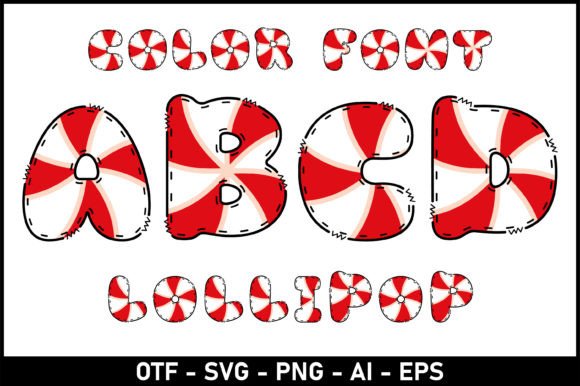
At its core, Lollipop Font is characterized by its playful curves and often hand-drawn appearance. It falls into the category of modern typography that mimics the irregularities of human handwriting, giving it a warmth that rigid sans serif fonts often lack. The visual style is typically bold and rounded, designed to evoke feelings of joy and nostalgia. This makes it a distinct departure from the formality of a standard serif font or the neutrality of a generic sans serif font.
The appeal of Lollipop Font lies in its ability to act as a focal point. In the hierarchy of a design, a display font is usually reserved for headlines or short bursts of text that need to stand out. Because of its strong personality, Lollipop Font can set the tone for an entire brand identity. It tells the viewer immediately that the content is approachable, fun, and perhaps a bit mischievous. For designers working on packaging design, this emotional shorthand is invaluable—it can make a product jump off the shelf before the customer even reads the copy.
Practical Applications: From Print to Pixel
One of the most common use cases for this typeface is in publishing and editorial design, specifically for younger audiences. Children’s books require fonts that are engaging and easy to decipher, even for early readers. Lollipop Font often fits this niche perfectly, offering clarity without sacrificing visual excitement. However, its utility extends far beyond bedtime stories.
For entrepreneurs and small business owners, this font is a strong contender for branding materials. Think about a coffee shop menu, a boutique clothing tag, or the header of a whimsical blog. In these scenarios, the font contributes to the atmosphere. It helps build a cohesive brand identity that feels personal and curated. Marketing professionals also utilize these styles for flyers, posters, and invitations where the goal is to create a sense of celebration or urgency in a friendly way.
The Technical Side: Compatibility and Cutting Machines
For the crafters and hobbyists in the audience, particularly those working with cutting machines like Cricut or Silhouette, technical compatibility is just as important as aesthetics. It is crucial to understand the file formats included with Lollipop Font to avoid workflow interruptions.
The black version of the font is designed to be versatile and is fully compatible with Cricut Design Space and other standard cutting software. This allows you to cut vinyl decals, paper crafts, and stencils with clean vector paths.
However, the color version of Lollipop Font—which might include gradients, textures, or multi-colored layers within the font file itself—operates differently. These specific design assets are generally only compatible with advanced design programs like Adobe Photoshop, Illustrator, Silhouette Studio (Designer Edition or higher), and Inkscape. The OTF or TTF files for the color version usually cannot be uploaded directly into Cricut Design Space because Cricut treats fonts as single-layer vectors by default.
- For Cricut Users: Stick to the standard black version for direct cutting.
- For Digital Designers: Use the color version in Illustrator or Photoshop to create rasterized graphics that can then be uploaded to cutting software as a flattened image.
Strategic Design and Font Pairing
Using a decorative font effectively requires restraint. If you use Lollipop Font for every line of text in a brochure, you risk overwhelming the reader and sacrificing readability. The "wall of text" effect is real; display fonts are not optimized for long-form body copy.
The best practice is to use Lollipop Font for headlines, sub-headers, or call-to-action buttons. For the body text, you need a complementary typeface. A clean, modern sans serif font is often the best partner. The neutrality of a sans serif provides a visual resting place for the eyes, allowing the playful energy of the headline to shine without causing fatigue. Alternatively, a simple serif font can create an interesting contrast if you are aiming for a more vintage or editorial look.
When evaluating project fit, consider your audience. While Lollipop Font is excellent for engaging a creative or youthful demographic, it may not be the right choice for a corporate law firm or a serious financial report. Context is everything in typography. A playful font in the wrong setting can undermine credibility, whereas in the right setting—like a birthday invitation or a toy store logo—it builds trust and connection.
Final Considerations for Commercial Use
Before integrating any new typeface into a commercial project, always review the licensing. Most premium fonts come with specific terms regarding how they can be used. Ensure that your license covers your intended use, whether that is on physical products for sale, digital templates, or client logos. Taking the time to check these details protects you legally and ensures you are respecting the work of the type designers.
Ultimately, Lollipop Font is a powerful asset in a designer's toolkit. It brings a specific energy that few other typefaces can match. By pairing it wisely, respecting its technical requirements, and applying it to the right context, you can elevate your designs from ordinary to memorable.